How to Prepare for Registration
- Login to online registration
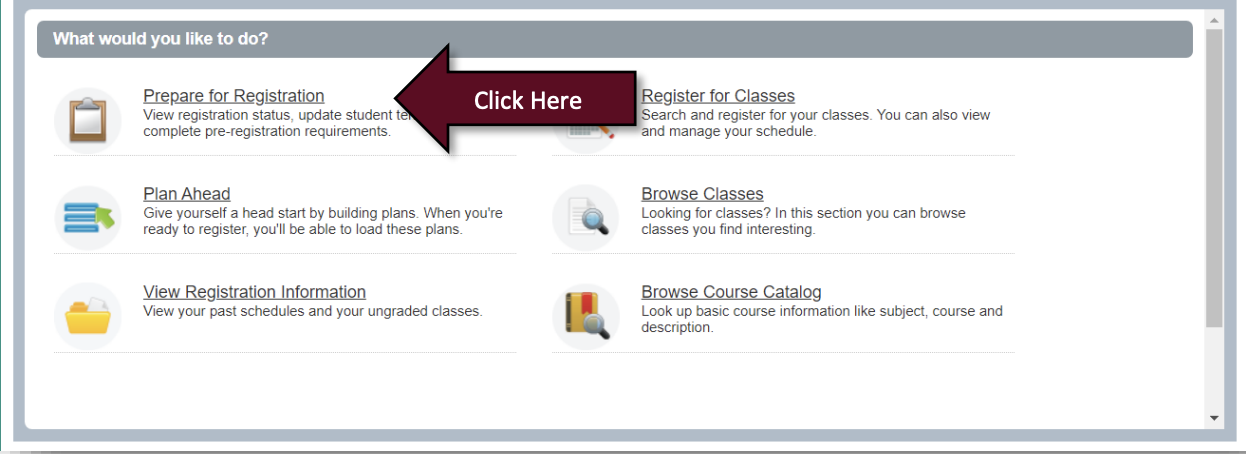
- Next click on Prepare for Registration
- Enter in your desired term for registration and then click Continue

- Your Registration Status will be displayed. Be on the lookout for any red exclamation icons which indicate an issue that will prevent you from registering. For questions on your registration status please contact the Office of the Registrar by phone 317-788-3219 or by email registrar@uindy.edu.
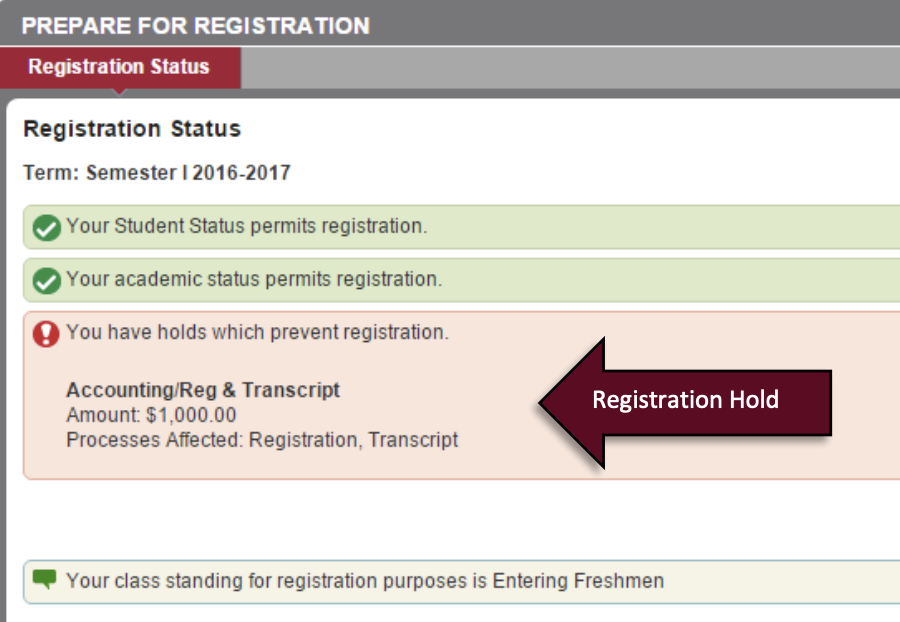
Tip: Registration Status is term specific. If you are planning to register for multiple-terms, please check your registration status for each upcoming term.
Registrar
- Office of the Registrar
- Academic Petitions
- Drop/Add and Withdrawal
- Forms
- Request a Transcript
- Request a Duplicate Diploma
- Apostille Document Request
- Verification of Enrollment
- Updating Your Name
Courses & Curriculum
- Academic Calendars
- Academic Catalogs
- Curriculum Guides
- Articulation Agreements
- Course Schedules
- Final Exam Schedule
- Registration Information
- Spring Term
- Academic Alert and Ineligibility
- Accessing Registrar Services Online
- Credit by Examination
- Dean's List and Honor Roll
- DegreeWorks
- FERPA/Confidentiality of Student Records
- Grades/GPA
- Parent/Guardian Proxy
- Repeating a Course
- Special Course Registration
- Student Services Quick Guide
- Transfer Credit
- Waitlisting