Introduction
- Office of Student Billing and Payment
- 317-788-3221
- studentbilling@uindy.edu
- uindy.edu/student-billing
- Questions regarding your balance due, payment plan or payment status should be directed to this office.
- Office of Financial Aid
- 317-788-3217
- financialaid@uindy.edu
- uindy.edu/financial-aid
-
Questions regarding applying for aid, your financial aid offer, or loan options should be directed to this office.
- Residence Life
- 317-788-3530
- reslife@uindy.edu
- uindy.edu/residence-life
- Questions regarding housing and meal plans should be directed to this office.
Timeline for May/June New Hounds Days
*Billing deadlines remain the same regardless of when you attend New Hounds Day
May/June
- Review remaining financial aid steps in your admissions portal.
- Complete financial aid and receive aid offer.
New Hounds Day! Register for classes.
- There is still time! Complete financial aid to reduce your balance.
- Use your aid offer to estimate your balance, decide how to manage it.
- Accept loans included in your aid offer, if desired.
- Research payment plans and other loan options.
- Ask your student to set up an authorized user.
July
Bills issued July 8.
- Check on non-UIndy scholarships.
- Verify housing and meal plan charges.
- Sign up for a payment plan to manage your balance.
- Pay your bill in full.
- Request 529 disbursement.
- Confirm that your balance is paid in full or accurately covered by a payment plan.
- Take advantage of our 5 month payment plans.
August
Bills due August 7.
- Move in / Welcome Week.
- Classes start August 31.
-
Release refunds on or after the first day of class.
Timeline for July New Hounds Days
*Billing deadlines remain the same regardless of when you attend New Hounds Da
May/June
- Review remaining financial aid steps in your admissions portal.
- Complete financial aid and receive aid offer.
July
New Hounds Day! Register for classes.
Bills issued one week from New Hounds Day.
- There is still time! Complete financial aid to reduce your balance.
- Use your aid offer to estimate your balance, decide how to manage it.
- Accept loans included in your aid offer, if desired.
- Research payment plans and other loan options.
- Ask your student to set up an authorized user.
- Check on non-UIndy scholarships.
- Verify housing and meal plan charges.
- Sign up for a payment plan to manage your balance.
- Pay your bill in full.
- Request 529 disbursement.
- Confirm that your balance is paid in full or accurately covered by a payment plan.
- Sign-up for BankMobile.
- Take advantage of our 5 month payment plans.
August
Bills due August 7.
- Move in / Welcome week.
- Classes start August 25.
-
Release refunds on or after the first day of class.
- July 8, 2026 - Bill issue date for Semester 1
- August 7, 2026 - Bill due date for Semester 1
- August 26, 2026 - Move-in for resident students and Welcome Week starts
- August 31, 2026 - First day of classes
- September 4, 2026 - End of Drop/Add period. Students with unpaid balances could be dropped from all classes.
- November 11, 2026 - Bill issue date for Semester 2
- December 11, 2026 - Bill due date for Semester 2
Financial Aid
The financial aid offer includes important information about a student’s scholarships, grants, and other financial aid available at UIndy as well as an estimate of costs for the year based on program and housing status. Students can view an electronic copy of their aid offer through their admissions portal.
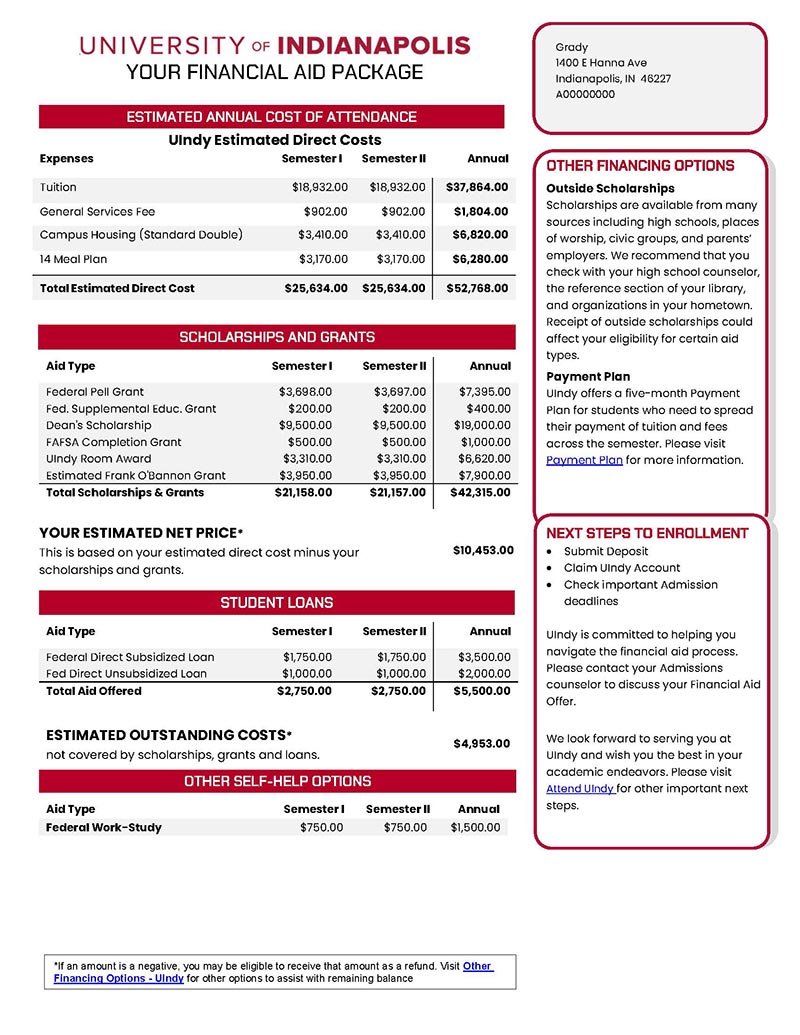
Notes:
- The estimated costs are based on program and housing status.
- Federal student loans are for your student to review and accept online.
- Explore student loans, payment plans, or other options to cover the balance.
There are multiple ways to manage your balance, visit uindy.edu/alternative-financing-options to learn more.
Information about outside scholarships can be found at uindy.edu/outside-scholarships.
Student employment is a great option to help students fund their education. The money earned from a job on campus or nearby won’t automatically go towards the student bill. Instead, students can use what they earn to pay for their educational expenses. Learn more at uindy.edu/financial-aid/work-study.
You might have other costs as a student, including books and supplies, transportation costs and personal expenses. Visit uindy.edu/cost-to-attend to find out more.
As a financial aid recipient, you have rights and responsibilities. Review important consumer disclosure information at uindy.edu/student-consumer-info.
Students will need to accept, decline, or modify the loan amount for:
- Federal Direct Subsidized Loans
- Federal Direct Unsubsidized Loans
Students can make their loan selection online:
- Go to my.uindy.edu
- Click on 'Self Service' and log in with your UIndy username and password
- Click on 'Financial Aid'
- Click on 'Award Offer'
All new Federal Student Loan borrowers will need to complete a Master Promissory Note if one is not already on file. You can complete your Master Promissory Note online. If you are a new federal loan borrower then you will also need to complete Student Loan Entrance Counseling.
If you have previously borrowed, you are encouraged to review your federal loan history at studentaid.gov. You'll be able to see your total amount borrowed as well as the federal servicer assigned to your student loans.
Billing
You will need to have the email address of the individual you are setting up as an Authorized User before beginning this process.
- To add an authorized user to your billing account, visit ebill.uindy.edu. You may also visit the billing website through my.uindy.edu or by using the embedded link in your E-Bill.
- Log in to the E-Bill system. Students should click on ‘Current Student Login’ and use their UIndy username and password. Students may contact the UIndy Help Desk via techhelp.uindy.edu.
- In the My Profile Setup box select ‘Authorized Users.’
- Select ‘Add Authorized User.’
- Type in the email address of the authorized user.
- Answer two questions about the type of access you are granting to the authorized user and click on ‘Continue.’
- Read the Agreement to Add Authorized User statement. If you agree to the terms of the statement click the ‘I Agree’ checkbox and click on ‘Continue.’
- The authorized user will receive two email notifications; one containing their username and one with a temporary password.
Questions?
Students may contact the Office of Student Billing & Payment at 317-788-3221 or email at studentbilling@uindy.edu.
Students may grant access to an authorized user, usually a parent or guardian, which will allow the user to view, print and pay their UIndy bills. Access is granted and maintained by the student and can be granted or removed at any time.
Please note that the University cannot, under any circumstance, confirm, grant, revoke, or modify an authorized user on a student’s behalf.
The UIndy E-Bill Student Account Center allows students to check their account balance, view or print their bill, make a payment, add an authorized user, or enroll in a payment plan.
Student Need Their UIndy Username and Password
If they need this information, they should visit techhelp.uindy.edu for information about claiming their account or resetting passwords.
- Visit ebill.uindy.edu. The billing website is also available through my.uindy.edu.
- Log in using their UIndy username and password.
- View and Accept Refund Policy.
- Review the Tuition Protection offer from GradGuard and Accept or Decline coverage.
Mobile Alerts
Optional: Set up Mobile Alerts to receive text messages about selected account events and bill notifications or account payments.
- In the My Profile Setup box select ‘Personal Profile.’.
- Find the section that mentions Mobile Number and click ‘Edit.’
- Enter your cell phone number, select ‘Carrier,’ and click ‘Save.’
- Check the box next to “Send me additional text message notifications about my account events (such as new bills or upcoming payments)”.
- A pop-up box will show on the screen to confirm you want to receive additional text notifications. Select ‘OK.’
See the following pages for information on adding an authorized user, setting up a payment plan, making an online payment, using TransferMate for an international wire, a setting up your BankMobile refund preference.
Bills are viewable via the E-Bill site. Log in and select "View Statements".
Billing statements will be generated and sent weekly prior to the start of the semester to allow families to track updates to their balance.
If you haven’t completed the financial aid process your bill may not reflect all of the aid you are eligible for.
Remember that it may take up to 4 weeks for funds from 529 plans to arrive at UIndy and be reflected on the billing statement.
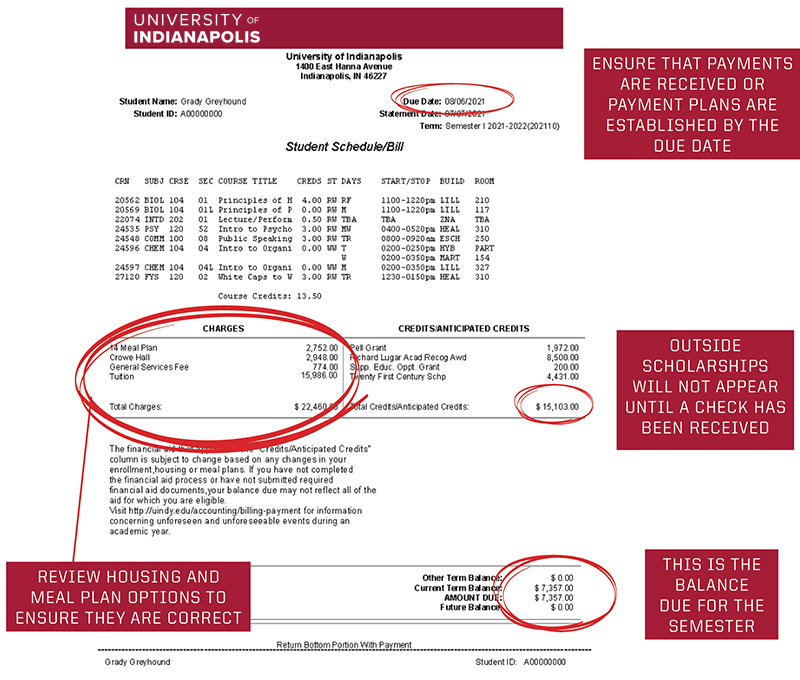
Notes:
- Ensure that payments are received or payment plans are established by the due date.
- Review housing and meal plan options to ensure they are correct.
- Outside scholarships will not appear until a check has been received.
- The balance due for the semester is located on the bottom-right corner of the bill.
Payments
How to Pay
Payments can be made:
- Online using an electronic check
- Online using a card (a 3% convenience fee applies)
- Check - in office or by mail at the address to the right
- TransferMate (International wire payment). Visit TransferMate Global Payments for more information.
Cash payments and payments via phone or fax are not accepted.
Payment Plans
We offer monthly payment plans to students in eligible programs. View our current offerings on the E-Bill site. Look for the ‘Payment Plans’ tab.
- If you are currently enrolled in a payment plan, please follow the payment due dates as outlined in your plan.
- Please verify that the plan amount covers the current account balance. Changes to classes and/or housing can cause your balance to change.
- If you need to make adjustments to your payment plan, please contact our office at 317-788-3221 or studentbilling@uindy.edu.
529 Payments
Plan ahead for 529 payments. Have the check mailed to the address below and make sure it references your Student ID number (A0XXXXXXX).
Office of Student Billing & Payment
1400 East Hanna Avenue
Indianapolis, IN 46227
It may take up to 4 weeks for UIndy to receive a 529 payment so start the process early.
Payment Plans
Payment plans include specific timelines and may involve additional fees if payments are missed.Tip: Enroll early and select automatic ACH payments to reduce fees and keep your account on track.
- $100 Payment Plan Enrollment fee, this can be waived when you choose automatic ACH payments on your payment plan!
- $100 Late Payment fee, applied to balances over $200 if a payment plan is not set up or paid in full by our bill due date.
- $50 Late Installment Payment fee, charged for each missed or late payment within your plan.
5-Month Plan
- Enrollment open July 6 - 15
- Payments July - November
- Payments due monthly on the 10th
If enrolling after July 15th, your first payment will be due at enrollment.
4-Month Plan
- Enrollment opens on July 16
- Payments August - November
- Payments due monthly on the 10th
A student can have only one payment plan each semester and plans do not carry over from semester to semester. You will need to enroll each semester you’d like a payment plan.
Looking Ahead
Semester II Payment plans will be available starting in November.
-
5-Month Plan
-
Payments December - April
-
Payments due monthly on the 10th
-
-
4-Month Plan
-
Payments January - April
-
Payments due monthly on the 10th
-
The Family Educational Rights and Privacy Act of 1974 (FERPA), also known as the “Buckley Amendment,” is a federal law that gives protection to student educational records. Due to FERPA, a student must grant access to their billing information. A person that has been set up as an authorized user will use the information below to access the UIndy E-Bill site.
An authorized user will receive two emails from studentbilling@uindy.edu once their student has added them as an authorized user. The user will need the email address the student used and their temporary password sent in the email notifications. During initial login, the authorized user will be prompted to update their password. For assistance email studentbilling@uindy.edu or call 317-788-3221.
- Navigate to ebill.uindy.edu and select ‘Authorized User Login.’
- Log in using your email address and temporary password (for future logins you will use the new password you created during your initial login).
- View and Accept Refund Policy.
- Review the Tuition Protection offer from GradGuard and Accept or Decline coverage. If your student has already elected coverage the offer will not appear.
Mobile Alerts
Optional: Set up Mobile Alerts to receive text messages about selected account events and bill notifications or account payments
- In the My Profile Setup box select ‘Personal Profile.’
- Find the section that mentions Mobile Number and click ‘Edit.’
- Enter your cell phone number, select ‘Carrier,’ and click ‘Save’.
- Check the box next to “Send me additional text message notifications about my account events (such as new bills or upcoming payments)”.
- A pop-up box will show on the screen to confirm you want to receive additional text notifications. Select ‘OK.’
For more information, visit Tuition Protection Plan.
Students need their UIndy username and password to log in. If you need assistance with your account, please visit techhelp.uindy.edu.
Authorized users need the login credentials created after their student authorizes them. To view more information or an instructional video please visit Pay Your Bill / E-bill Instructions.
- Visit ebill.uindy.edu.
- If you are making payment in full or a partial payment, select ‘Make Payment’ from the top bar of the page.
- The system defaults to the current balance due. If you will be paying in full click ‘Add’ then ‘Continue’. If making a partial payment change the amount in the box click ‘Add’ then ‘Continue.’
- Select your payment method from the drop down box and click ‘Continue’
- If paying by card, a summary screen will show. If correct, click ‘Continue to PayPath’. The Paypath screen will pop up. Follow all of the prompts to enter in your card information, and confirm the amount being charged, making sure to review the additional charge for the convenience fee. Agree to the terms and conditions and click ‘Submit Payment.’
- If paying by electronic check, enter your routing and account numbers and click ‘Continue’. Follow the remaining process until finally, clicking ‘Submit Payment.’
Note: If you are enrolled in a payment plan and have not scheduled your payments for automatic deduction you’ll make your payment by selecting the gear icon next to the installment and selecting ‘Pay’. Then follow the instructions above for your chosen payment method.
Cards (Credit of Debit)
Any payments made with a debit or credit card will be assessed an additional 2.95% convenience fee.
Checks
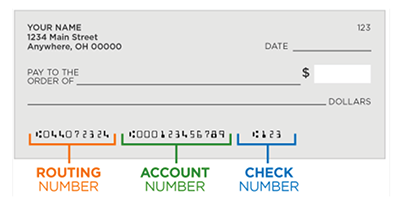
You will need your bank account ABA routing number and related account number if making payment from your checking or savings account.
You may split your payment between bank accounts and credit cards. You will need to complete multiple transactions by making a partial payment using each method.
Payment for tuition, fees, and other University charges is due in full by the published payment date.
However, the UIndy Office of Student Billing and Payment offers interest-free payment plan options to students and their families to assist in paying the entire balance. The $100 enrollment fee is being waived.
Current payment plan offerings may be viewed by logging in on the E-Bill site and navigating to the Payment Plans tab. Only one payment plan per student can be established each semester. For more information regarding payment plans or to view a plan enrollment video please visit Payment Plans.
Determine if the student or authorized user will enroll in the payment plan.
If you are a student enrolling in the payment plan you will need your UIndy username and password. If you need assistance with your account, please visit techhelp.uindy.edu.
If you are an authorized user enrolling in the payment plan you will need your email address and password.
You’ll need your payment information if you decide to schedule your payments for automatic deduction.
To Enroll
- Log in to ebill.uindy.edu for students and authorized users.
- Click the ‘Payment Plans’ tab at the top of the page.
- Click on ‘Enroll Now.’
- Select the term ‘Sem. I, 2026-2027’ from the drop down box and click ‘Select.’
- The available payment plan will display. You can view the details by clicking ‘Details,’ which will outline the plan information and amount of your installment payments. When you are ready to proceed click ‘Select.’
- The Payment Plan Enrollment screen will show your balance and payment schedule including payment dates and amounts. Click ‘Continue.’
- You can opt to schedule your payments to automatically withdraw funds from your chosen payment method. If you opt to schedule your payments you will be taken to the payment screen to select your payment method. See Payment Options for payment instructions.
- If you do not select automatic payment, click ‘Continue.’
- A Payment Plan Agreement will pop up confirming your total amount due, installment amounts and due dates, and important information regarding the plan. Please review carefully, agree to the terms and conditions. You can print out a copy of the agreement for your records. Once ready click ‘Continue.’
- The payment plan screen will reload showing your enrollment in the payment plan. You should see your plan installments listed with their due dates and amounts.
- If you did not select automatic payments, make sure to log into the system to make payment by the installment due date. You’ll want to make sure you are paying the correct installment so look for the list of installments and select the gear next to the installment you are paying. This will help ensure that your payment is appropriately applied to your payment plan.
If you have any questions about payment plans or making a plan payment please contact the Office of Student Billing and Payment at studentbilling@uindy.edu or 317-788-3221.
At UIndy, we know that our international students often have to pay significant international transfer fees when paying for their tuition fees and expenses. We teamed up with TransferMate to provide you with a transparent payment method to reduce additional bank fees and improve your payment experience. TransferMate helps international students pay tuition and fees in their local currency from any country. The benefits of using TransferMate include faster payment posting to your student account, local currency payment methods, great exchange rates, 24-hour customer service from TransferMate, and 24-hour online tracking of payments.
You will need your UIndy username and password. If you need assistance with your account, please visit techhelp.uindy.edu.
You will need the payment information that you will be using to make payment.
- Visit ebill.uindy.edu. You may also visit the billing website through my.uindy.edu or by using the embedded link in your E-Bill.
- Click the ‘Make a Payment’ button and enter the payment amount. Click ‘Add’ then click ‘Continue’.
- From the Method drop down box, select ‘TransferMate INTL’ and click ‘Continue’.
- Choose the country you are paying from and click ‘Review Rates’. To proceed with Payment click ‘Enter Details’.
- Complete the student and/or payer details information and click ‘Continue to Confirmation’.
- A summary page will load. Click ‘Initiate Payment’. You will receive payment instructions via a popup box as well as email from TransferMate on how to complete the necessary payment.
Note: Your payment will not process until you’ve completed the steps outlined by TransferMate to submit payment to the University.
24/7 live help is available. Email questions to edu@transfermate.com. If you prefer to call the TransferMate Contact Center, look for your country’s specific helpline telephone number under Help - Contact Us after logging in and selecting TransferMate in the International Students section.
Refunds

UIndy delivers your refund with BankMobile Disbursements, a technology solution, powered by BMTX, Inc. Be on the lookout for your green refund selection kit from BankMobile. For more information, visit Refund Choices. We recommend you set up your preference even if you aren't expecting a refund.
Two refund options are available: Deposit to An Existing Account or a BankMobile Vibe Checking Account.
To activate your refund preference follow the steps below:
- Log in at my.uindy.edu
- On the Student Page go to the Student Resources section
- Under Finances, click the ‘Refund System’ link.
- Review the two refund options and ‘Select’ the option that best meets your needs.
- Deposit to an Existing Account: a direct deposit to your personal checking or savings account so you will need your routing and account information. There is a 1-2 business day delay in receiving your funds after the University releases your refund.
- BankMobile Vibe Checking Account: open a checking account with BankMobile. You will need to go through an identity verification process. Funds are available the same day as the University releases your refund. You will receive a Vibe card from BankMobile. The $2.99 monthly service fee is avoidable with $300 qualifying deposits per statement cycle.
- Once you’ve made your selection you will enter your contact information and complete the rest of the enrollment process.
- Deposit to an Existing Account: Enter your banking information, confirm your information is correct, and ‘Submit’
- BankMobile Checking Account: Read and accept the Fee Schedule; then read and accept the Terms and Conditions; read and accept the Related Disclosures and Privacy Statement; then complete the additional profile information; and create your PIN for your account. Your virtual card information will display. This can be used while you are waiting for your physical card to arrive.
- Complete your Account Security Questions
For students who have credited aid or other payments that exceed charges, a refund will be released with BankMobile Disbursements on the first day of classes each semester. After the first day of a semester, refunds are available on Fridays. Some special assistance programs require a delay in refund processing until after the 100% refund period has passed. Students who are paying University charges through one of UIndy’s payment plans are not eligible to receive any credit balance refunds until the payment plan contract is paid in full and the University has received all payments.
Note: For parents that have taken out a Parent PLUS loan there were two refund options during your PLUS application – Refund to Student or Refund to Parent. If you selected Refund to Student this will process via BankMobile during the normal semester refunding process. If you selected Refund to Parent a paper check will be mailed to you on the first day of classes for the semester.
More information regarding refunds can be found by visiting the UIndy Refund page.